
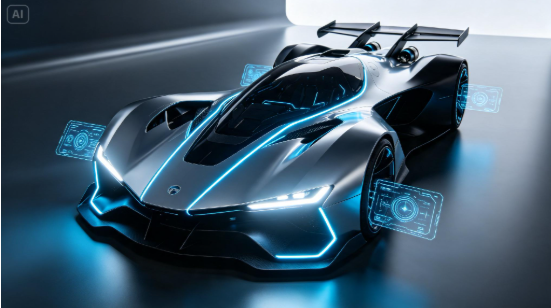
Every concept car, every sci-fi spaceship, every sleek motorcycle from a video game started as a rough idea in someone’s head before it became a polished render. The gap between “imagine a hover-bike” and an actual detailed image used to require serious illustration skill.
Not anymore.
An effective image generator can take a simple sentence and turn it into a fully rendered vehicle concept, complete with lighting, materials, and mechanical detail.
Dreamina handles this particularly well, translating loose descriptions into vehicles that look like they belong in a design studio rather than a sketchbook.
Here’s how to take your own idea from sentence to showroom-ready render.
What separates a good concept from a generic one
A believable futuristic vehicle needs a sense of function, even if it’s fictional. It should look like it was engineered for a purpose — speed, stealth, cargo, combat — rather than just decorated with glowing lines. That sense of purpose comes from describing structural logic, not just surface style.
Strong concept prompts usually specify:
- The vehicle’s purpose or environment (racing, off-world, stealth, cargo)
- Material choices (brushed metal, matte composite, glass canopy)
- A distinct lighting source that defines its mood
The process of creating a distinctive vehicle shape
To design an effective concept vehicle, one doesn’t need to adhere to traditional forms. You can opt for strange proportions, install asymmetric shapes, keep the wheels hidden, make the modules movable, or place the cockpit in an unexpected spot.
Make sure to explain how the form is relevant to its function to avoid creating an illogical design solution.
The strategy of laying a visual basis for the vehicle
An attractive 3D image of the vehicle can turn into the basis of the whole universe. After you determine the type of materials, types of light, colors, and construction methods, you need to implement these styles in different backgrounds. Illustrate your vehicle from the side, in a futuristic garage, in the process of racing, etc.
This creates a possibility of evolving your vehicle into a whole family of designs, both in terms of its rendering and in terms of its concept.
Starting from a feeling, not just a shape
Instead of jumping straight to “spaceship” or “motorcycle,” start with a feeling — aggressive and armored, sleek and silent, rugged and industrial. That emotional direction shapes every detail that follows, from the angle of the panels to the color of the light source, and gives Dreamina a much clearer target to render toward.
From idea to render in three moves
Dreamina keeps the process fast enough that you can explore several concepts in one sitting.
Step 1: Enter a text prompt
Open Dreamina and describe your vehicle with specific detail: its shape, materials, lighting, and setting. If you have a rough sketch or a reference image of a similar design style, upload it alongside your text.
A sample prompt might be: A futuristic armored transport vehicle designed as a person dressed as its test pilot standing beside it, matte gray hexagonal plating, glowing blue thruster vents, positioned on a rocky alien terrain under a dual-sun sky, dramatic side lighting, ultra-detailed.
Step 2: Adjust parameters and generate
Select Image 5.0 Pro, built on Seedream 5.0 Pro, for crisp mechanical detail and accurate material rendering, then choose your aspect ratio, canvas size, and resolution — 1K for fast previews, 2K for portfolio-quality output. Click the generate icon and let it build your concept.
Step 3: Customize and download
Use Dreamina’s editing suite to refine the result: inpaint to adjust specific mechanical details, expand to reveal more of the surrounding environment, remove to eliminate distracting elements, and retouch for a final polished finish. Once satisfied, click Download.
The models shaping Dreamina’s design output
Dreamina runs on a set of different image generation models, and knowing their strengths helps when you’re chasing a specific mechanical aesthetic.
Seedream 5.0 Pro, the most recent and most capable model in the lineup, is especially strong for vehicle work because of how well it handles reflective surfaces, complex panel geometry, and consistent lighting across metallic and glass materials — details that make or break a concept render. It’s the model worth reaching for whenever precision matters more than speed.
Nano Banana is a fast, lighter option that’s useful for quickly testing silhouette and color direction before committing to a fully detailed pass. GPT Image 2 handles longer, spec-heavy prompts well, which suits designers who like describing exact mechanical features in detail rather than broad strokes.
Designing for a world, not just a vehicle
The strongest concept renders place the vehicle inside a believable environment rather than a blank void.
A racer belongs on a glowing track; a transport belongs on rugged terrain; a stealth craft belongs in shadow.
Describing that environment alongside the vehicle gives the whole image narrative weight.
Material choices that instantly read as “future”
Certain material and lighting choices consistently signal advanced technology without needing extra explanation:
- Brushed metal paired with glowing seams or vents
- Matte, non-reflective composite panels
- Holographic or translucent glass elements
Where these concepts get put to use
Vehicle renders built this way show up across a wide range of projects:
- Game and film pre-production mood boards
- Portfolio pieces for aspiring concept artists
- Worldbuilding art for novels and tabletop games
- Social content for automotive and design enthusiasts
Iterate like a real design studio
Professional concept design rarely nails the final look on the first pass — it’s built through variations. Generate a few versions with different lighting or material choices, compare them side by side, and combine the strongest elements into your final prompt.
Your next concept is one sentence away
The distance between an idea and a finished design used to be measured in weeks of illustration work. Now it’s measured in a well-written sentence and a few clicks.
With Dreamina and the mechanical precision of multiple top models, turning “imagine a vehicle that…” into a finished concept render is free, fast, and genuinely fun to explore.